Badges
On this page7 sections
Badges are small images inside text, like the rank tags of big networks: OWNER, MVP++,
YOUTUBE... They need no resource pack and no mods, and they also work outside nametags (TAB,
chat, menus).
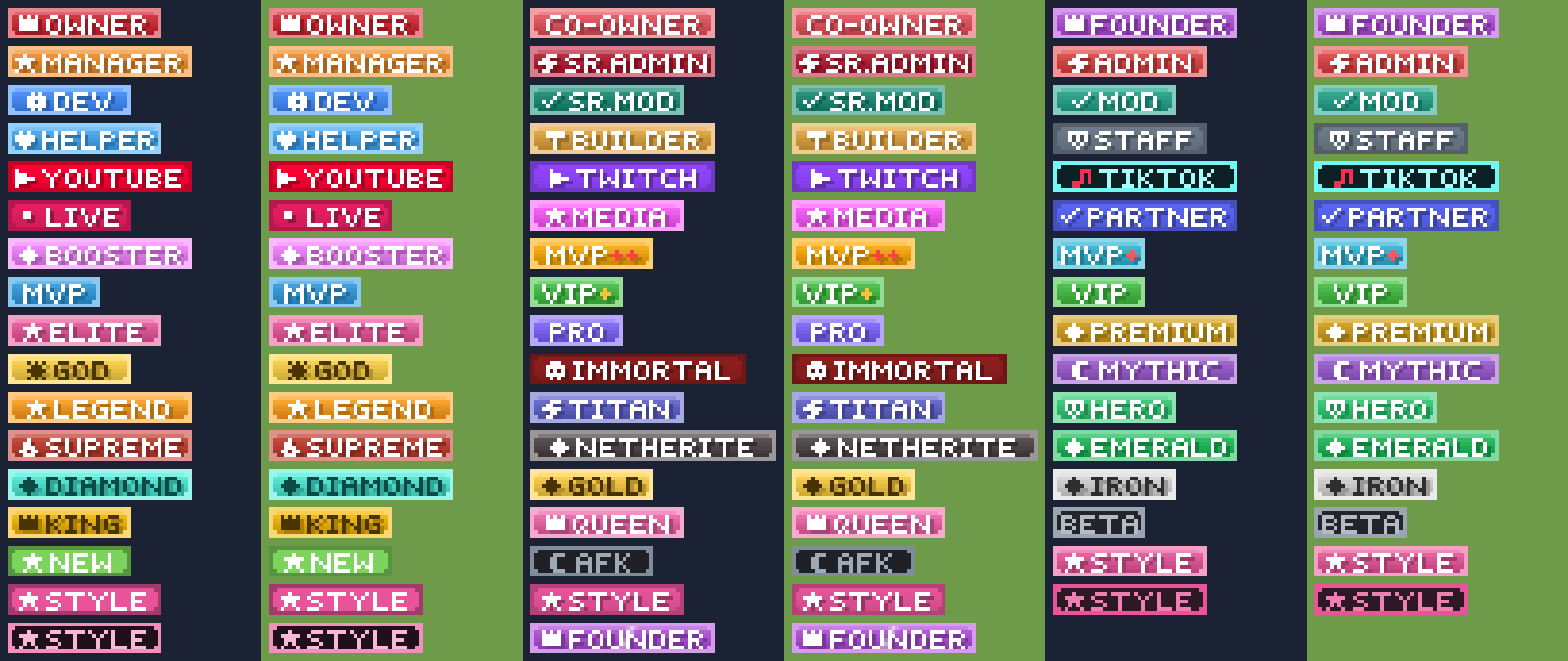
Using badges
- "<badge:owner> <red>{player}"   # a specific badge
- "<badge>{player}"               # the badge this player shows (nothing if they own none)
Who owns a badge: the permission advancednametags.badge.<id> (or the badge's permission).
/lp group vip permission set advancednametags.badge.vipWhich badge <badge> shows: the one the player picked (menu, or /nametag badge <id>), else
the first badge in badges.yml (top to bottom) they own. Put your most important badges first.
Admins can set it for a player: /nametag set <player> badge <id|auto|none>.
How it works (and why badges are rectangles)
Since Minecraft 1.21.9, text can contain the face of a player head (8×8 pixels). A badge is cut into 8×8 tiles; each tile becomes the face of a skin hosted by Mojang, and a row of heads draws the badge. The client downloads each tile once and caches it.
Minecraft draws the base layer of a downloaded skin's face always opaque: transparent pixels
become black. Only skins from a resource pack can be transparent. So badges are always solid
rectangles, and the bundled styles are designed for it: the four corner pixels take the border
colour and the rounding is drawn inside the border, which reads as a rounded tag without any
pixel that could look like a black hole. If you set rounded: false you get sharp corners;
corner: "#RRGGBB" paints the corner pixels a colour of your choice (e.g. your scoreboard's
background colour).
Clients older than 1.21.9 (through ViaVersion) and Bedrock players see the badge's fallback
text instead.
Designing a text badge
badges:
  champion:
    text: CHAMPION          # A-Z 0-9 space + - ! ? . : / & * [ ] # $ ' _ =
    icon: crown             # optional pixel icon on the left
    color: "#E0A82E"        # main colour; the style derives everything else from it
    style: gem              # gem | flat | solid | outline | neon
    shine: true             # a light sweeps across every few seconds
fallback: "<#E0A82E><b>CHAMPION</b>"| Option | Default | |
|---|---|---|
text | what it says, in the built-in pixel font (lower case is drawn upper case) | |
color | main colour (#RRGGBB or a name) | #5555FF |
style | gem (rim + gradient + shine pixel), flat, solid, outline, neon | gem |
icon | crown, star, heart, shield, diamond, bolt, sword, check, flame, skull, plus, dot, play, gear, hammer, pickaxe, music, moon, sun, arrow | none |
accent | colour of + * ! characters (the gold + of VIP+) | text colour |
text-color | text colour; use a dark one on light colours (gold, diamond, iron) | white |
text-shadow | false, or a colour for the 1-pixel text shadow | from the style |
fill, border | override the inside / the border colour | from color |
corner | colour of the four corner pixels | border colour |
rounded | rounded inner corners | true |
shine | animated sweep of light | false |
pause | seconds between two sweeps | 3 |
frame-ticks | ticks per frame of the sweep | 3 |
fallback | MiniMessage text for clients that cannot draw images | [ID] |
permission | who owns it | advancednametags.badge.<id> |
Preview: /nametag badges preview <id> puts the badge on your own nametag for a few seconds
(press F5 to look at it). /nametag badges opens the badge menu, where admins also see which
badges still need their textures generated.
Tips for good-looking badges
- Short words read best at nametag distance:
MVP+,DEV,LIVE. Long ones (NETHERITE) are fine in the tab list but get small above heads. - Mid-tone colours (
#3FBF3F,#E04040) give the best gradient; very dark colours look flat, very light ones needtext-colordark. - Use
accentto make one symbol pop:text: MVP++,accent: "#FF4040". shineon your top ranks only; it draws the eye.
Image badges (your own pixel art)
Draw a PNG exactly 8 pixels tall (any width; it is centred and padded to a multiple of 8 by
repeating the edge columns), put it in plugins/AdvancedNametags/badges/ (create the folder) and:
badges:
  discord:
    image: discord.png
    shine: true             # works on images too
    fallback: "<#5865F2>[Discord]"
Transparent pixels are drawn opaque (see above), so paint a background.
Texture badges (existing skins)
Any skin texture, by the hash at the end of its textures.minecraft.net URL (for example from
minecraft-heads.com (opens in a new tab), "Other → Value/URL"). One hash per 8×8 tile,
left to right. Nothing to generate. An entry can also be {value: ..., signature: ...} with a full
texture property.
badges:
  creeper:
    textures: ["<hash>"]
    fallback: "<green>[Creeper]"
Generating textures
The bundled badges ship with their textures. A new or changed text or image badge must be uploaded once to MineSkin (opens in a new tab) (which turns images into Mojang-hosted skins):
/nametag badges generate          # every badge that needs it
/nametag badges generate vip      # just one
Progress is shown in chat; stopping the server only pauses it (finished tiles are saved). Results are cached in data/badge-cache.yml forever, so each tile is
only ever uploaded once (shared between badges that have identical tiles). Without an API key
MineSkin generates 60 tiles an hour (10 a minute): a still 6-tile badge takes about a minute,
a 6-tile badge with shine (~20 tiles) a few minutes, and a big batch waits for the next hour by
itself (it says when it continues). A free key from https://account.mineskin.org/keys (opens in a new tab) raises the
limit: mineskin-api-key in badges.yml. Until a badge is generated, players see its fallback.
Badges outside the nametag
| Where | Use |
|---|---|
| TAB (tab list, scoreboard, its own nametags) | %advancednametags_badge% (the player's badge), %advancednametags_badge_<id>%, %advancednametags_badges% (all they own) |
| Any MiniMessage plugin with MiniPlaceholders (chat, menus, scoreboards) | <advancednametags_badge>, <advancednametags_badges> |
| Your plugin | AdvancedNametagsApi.get().badgeComponent("vip") |
# TAB groups.yml
_DEFAULT_:
  tabprefix: "%advancednametags_badge% "