Performance tuning
On this page5 sections
The defaults are tuned for busy servers; most owners never change them. This page explains what costs what, so you can tune for a 300-player hub or a PvP arena.
Where the cost is
Nametags are display entities that exist only in packets and ride the player, so the client moves them: walking, sneaking and swimming cost no packets. The server thread only takes a small snapshot of each player and resolves placeholders when they are due; every viewer's packets are built on that viewer's own network thread (also on Folia). What remains is bandwidth, in this order:
| Kind | Cost |
|---|---|
| Static line (no placeholders) | sent once when the player comes into view |
| Line with placeholders | re-sent when its value changes, checked every refresh-ticks |
| Looping motion | one small keyframe per line every animations.keyframe-ticks (5) |
| Transitions, reactions, appear | 2-tick keyframes only while they play |
Colour text effect (<wave>, <anim>...) | one whole text per frame, every text-effect-interval (2) ticks: the expensive kind |
| Badge next to a fast placeholder | a badge is about 200 bytes per 8×8 tile and is re-sent with every change of its line |
Measured with 100 players packed together, each seeing the 60 nearest nametags: static nametags 0.6 KiB/s per player, looping motions 5–7 KiB/s, the richest bundled design on everyone 17 KiB/s, a rainbow text effect on everyone 31 KiB/s; server tick around 5 ms.
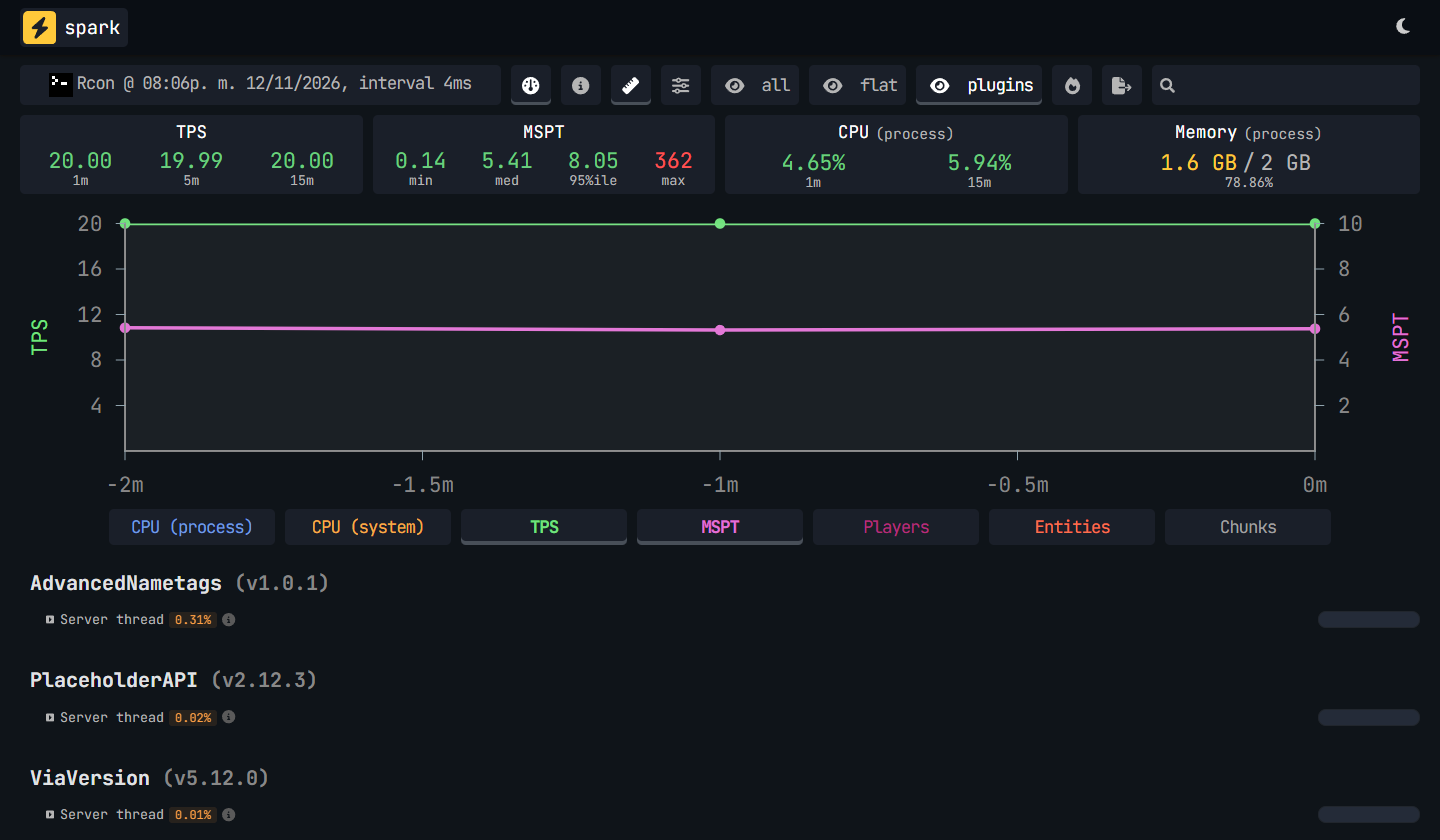
A spark profile of the same kind of test: 100 players in one spot for two minutes, wearing a mix of the bundled designs. The server held 20 TPS with a median tick of 5.4 ms, and Advanced Nametags used 0.31% of the server thread.
The bandwidth budget
performance.max-animation-bandwidth (32 KiB/s per player) caps everything that changes over time:
text effect frames, motion keyframes and placeholder updates. The budget refills every tick and can
burst up to a fifth of a second of traffic. Nametags are served nearest first, so in a crowd the
farthest ones slow down first; a new value (a rank change, a placeholder) waits at most 2 seconds.
max-animated-updates-per-tick (40) additionally caps text effect frames per player per tick.
0 turns the byte budget off.
Level of detail
- Within
visibility.always-visible-distance(24) nametags are always shown; up tomax-distance(48) only inside the viewer's view cone (fov, 110°); beyond, never. - A player sees at most
max-visible-per-viewer(60) nametags, the nearest. - Motions and text effects run fully up close and get coarser with distance: at
performance.animation-distance(24) motion keyframes are three times further apart and text effects skip two frames of three. Beyond that distance, or outside the view cone, they freeze. visibility.through-walls: dim|hidetraces up to two rays per nearby player everythrough-walls-interval(5) ticks: cheap, butshowcosts nothing.
Recipes
A big hub or a crowded lobby:
performance:
  max-visible-per-viewer: 40
  animation-distance: 16
  max-animation-bandwidth: 24
visibility:
  max-distance: 32
  always-visible-distance: 16
A PvP server (nothing reveals players behind cover, no wallhack):
display:
  see-through: false
visibility:
  through-walls: hide
sneak:
  hide: true
Smoother long curves for a showcase or a small server:
animations:
  keyframe-ticks: 3
performance:
  max-animation-bandwidth: 64
Designing cheap nametags
- Prefer movement (
motion,transition) to colour effects; use effects on short texts (a name, one word), not on whole lines. - Put fast values (
{ping},{health}) on their own line, away from badges and effects. - Give slow placeholders a long
refresh-ticks(100for a balance), fast ones a short one only where it matters (10for health). <icon:hearts>and<icon:food>draw up to ten sprites each; one<icon:heart>with{health}is lighter.- Check with
/nametag debugwhile players are online: its counters show packets, keyframes, text effect frames and how many were held back by the budget (read them).